
Overview#
This project is a lightweight IAM security audit tool built with Python and boto3. It connects to AWS using an AWS CLI named profile (no credentials in code) and evaluates IAM users for common hygiene risks such as:
- Stale console access (users who have never logged in or haven’t logged in recently)
- Active access keys (programmatic keys that may require review/rotation)
The output is a clear, scan-friendly terminal report designed to reduce manual IAM review time and support recurring security checks aligned with cloud security best practices.
Problem#
Manual IAM reviews do not scale well and are easy to miss under pressure—especially when the user base grows or multiple accounts are involved. Common gaps include:
- Users who retain console access long after they stop using it
- Service or human users accumulating programmatic keys with no rotation discipline
- Ad-hoc console checks that leave no consistent audit evidence
- Compliance expectations (e.g., periodic credential review) that are hard to meet manually
Goals and scope#
In scope (current version):
- Enumerate IAM users reliably using paginated APIs
- Identify stale console usage using
PasswordLastUsedwhere available - List and count active access keys per user
- Produce a terminal report suitable for quick review
Out of scope (planned improvements):
- Access key age / last-used checks
- MFA enrollment checks
- Policy analysis (over-permissioned users)
- Export to CSV/JSON for compliance evidence and integrations
Architecture and security design#
Least-privilege identity#
Instead of using root credentials, the audit runs under a dedicated IAM identity (e.g., audit-script-bot) with strictly scoped permissions.
- Principle applied: Least Privilege
- Operational safety: audit tooling cannot mutate resources
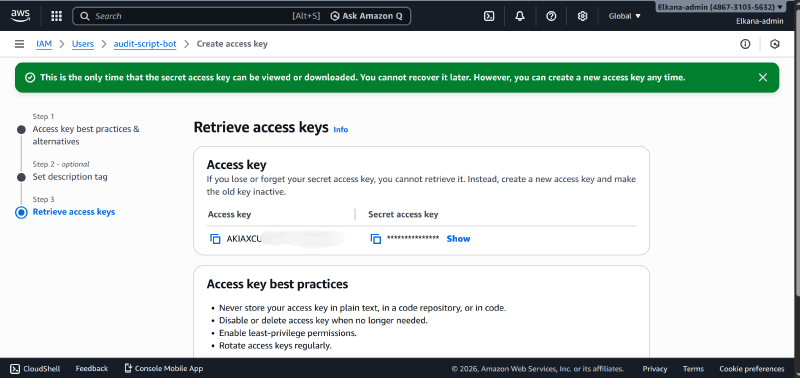
Profile-based authentication (no hardcoded secrets)#
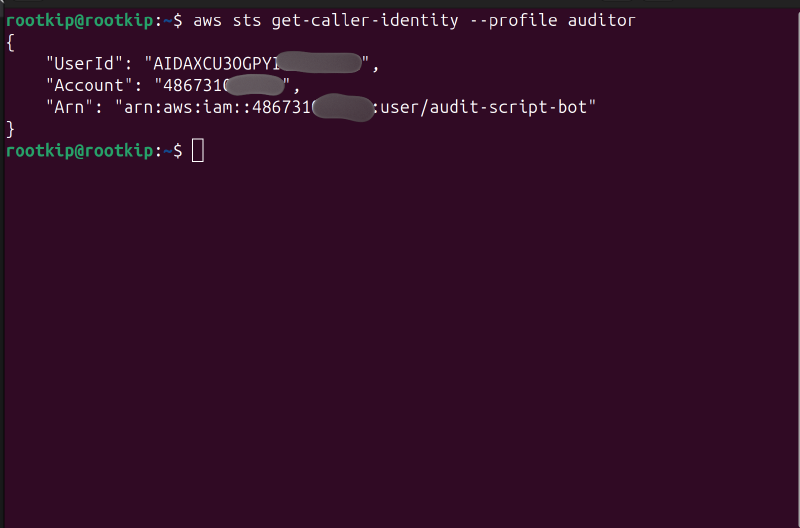
The tool uses an AWS CLI named profile (example: auditor) so credentials remain in ~/.aws/credentials and are not embedded in source code.
A quick verification step confirms the terminal session is authenticated as the intended audit user:
Implementation details#
Core audit logic#
Key engineering choices that make the tool safer and more reliable:
- Pagination: Uses boto3 paginators for
list_usersso results are never truncated in larger environments - Defensive access: Uses
.get()for optional fields likePasswordLastUsedto avoid runtime failures - Per-user access key listing: Calls
list_access_keysfor each user to detect active keys
Example (representative snippet):
session = boto3.Session(profile_name="auditor")
iam = session.client("iam")

paginator = iam.get_paginator("list_users")

for page in paginator.paginate():
    for user in page["Users"]:
        username = user["UserName"]
        password_last_used = user.get("PasswordLastUsed", "Never (or no password)")

        keys = iam.list_access_keys(UserName=username)
        active_keys = [
            k["AccessKeyId"]
            for k in keys["AccessKeyMetadata"]
            if k["Status"] == "Active"
        ]
How to run#
Create and activate a virtual environment:
python3 -m venv venvsource venv/bin/activate
Install dependencies:
pip install -r requirements.txt
Configure AWS CLI profile (example
auditor):aws configure --profile auditorVerify:
aws sts get-caller-identity --profile auditor
Run the audit:
python src/audit.py
Evidence and output#
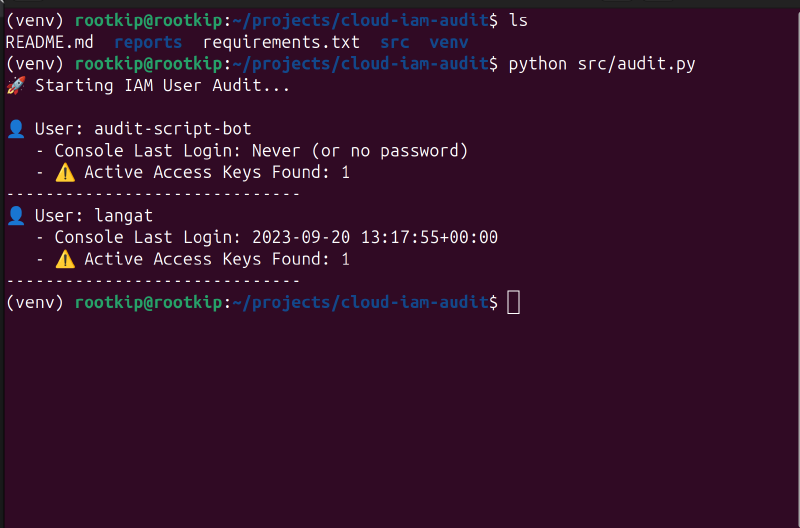
The tool produces a per-user summary including console login status and whether active access keys are present:
Results and impact#
What the tool delivers today:
- Full IAM user enumeration using paginated APIs
- Stale console usage visibility where
PasswordLastUsedexists - Detection of users with active access keys (for rotation and review workflows)
- A repeatable, low-risk audit process that avoids hardcoded secrets
Why it matters:
- Reduces manual audit time significantly compared to console-only checks
- Improves credential hygiene by surfacing accounts that need review
- Creates a consistent baseline process that can be run repeatedly
Limitations#
This version focuses on the safest, simplest checks first. Current limitations include:
- No access key age or last-used analysis (so rotation recommendations are limited)
- No MFA enforcement checks
- No export format (CSV/JSON) for audit trails or integrations
- No policy analysis to detect over-permissioned users
Next improvements (roadmap)#
If you want to evolve this into a stronger “v2” security audit tool, prioritize:
- Access key last-used + age checks (flag keys older than X days or unused)
- MFA status checks for human users
- CSV/JSON export for compliance evidence and automation pipelines
- Policy inspection (attached/inline) to detect risky permissions
- Multi-account scanning via AWS Organizations (read-only across accounts)
Security notes#
- Never store access keys in source code or commit them to git
- Ensure
.gitignoreexcludesvenv/, any.env, and local reports containing sensitive identifiers - Rotate and revoke unused access keys regularly
- Keep audit and remediation roles separate (audit should be read-only)
Links#
- GitHub Repository
- Least-Privilege IAM Patterns (related blog post)